NewFounding partner program now open for schools, seminaries and universitiesLearn more
Features

Everything you need to go from reading to mastery.

One app for reading, questioning, studying, and retaining, powered by AI that always shows its sources.

Seven actions on any passageSummarize, translate, save and more
Cited to book and pageClick through to the source
Read · Study · ImmersiveThree ways to read
Hokma · Study
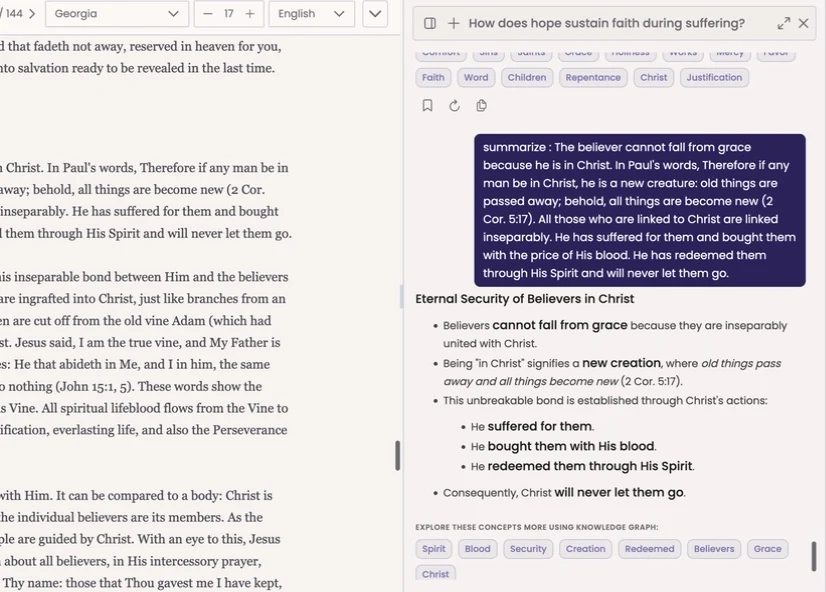
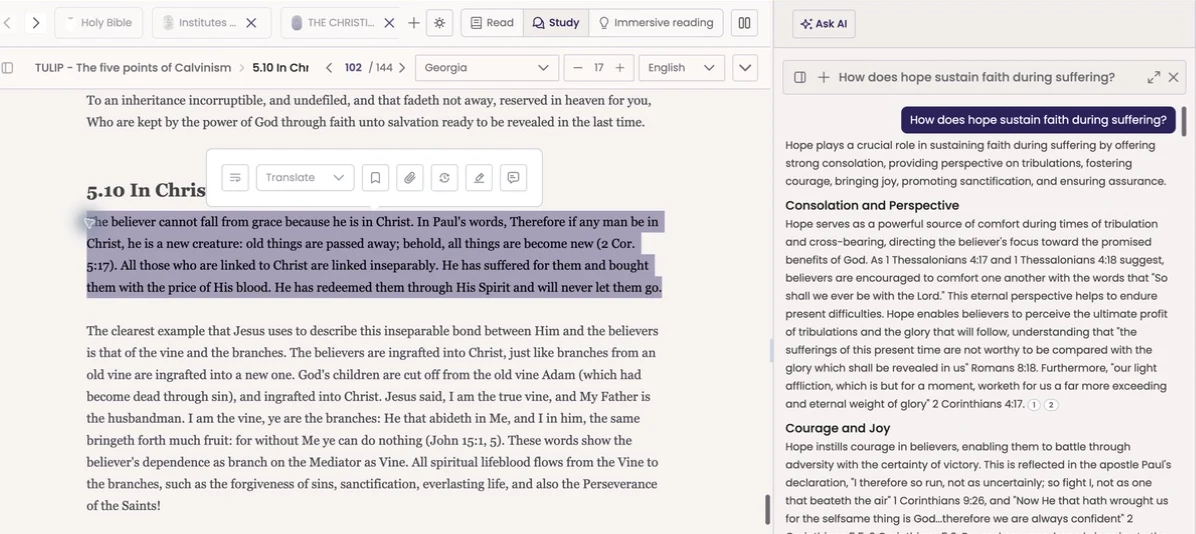
The Hokma reader in Study mode: a selected passage with its action menu, and a cited answer in the chat beside it
The Reader

Reading, redesigned for understanding.

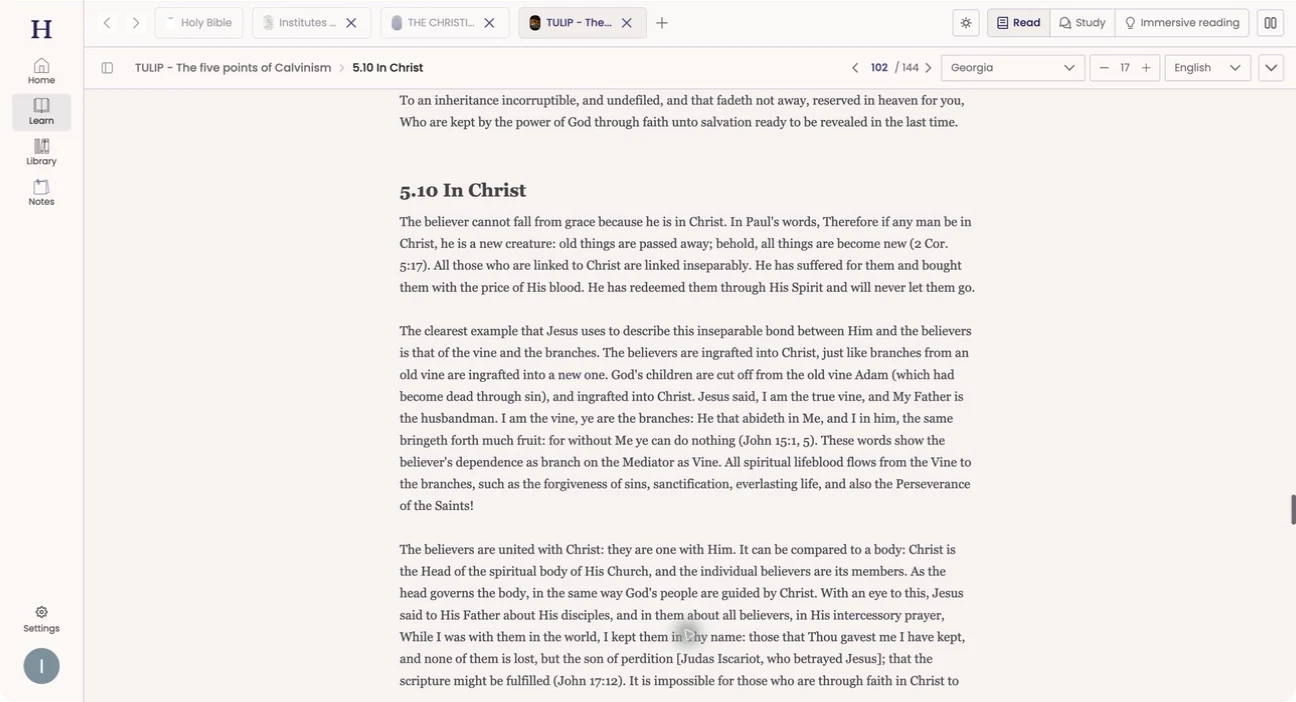
A clean, focused experience with an immersive, distraction-free mode. Keep several books open in tabs, or open two side by side: a text and its translation, two sources in dialogue, or a book next to your notes.

Multi-tab & split-screen study

Several books open at once, moved between freely. Open two texts side by side with independent page controls to compare, cross-reference, and follow an argument across sources.

  • Multiple book tabs, one click apart
  • Light and Sepia reading themes
  • Reader fonts, including Poppins and Georgia, with size controls
  • In-book figures preserved
Reader
The Hokma reader with several books open in tabs, a chapter page, and controls for Read, Study and Immersive reading

Two books, side by side

Each book keeps its own page position, so a text and its translation, or two sources in dialogue, stay exactly where you left them while you compare.

  • Independent page controls on each side
  • Built for comparison and cross-reference
Three ways to read
Mode 01

Read

A focused page in Light or Sepia, set in the font and size you prefer.

Mode 02

Study

The book on one side and the AI tutor beside it, so a question never takes you off the page.

Mode 03

Immersive

Timed focus sessions of 5, 10, 15, 30 or 45 minutes, or just reading, with Quick check cards along the way.

Attention-aware check-ins

As you read, Hokma can pose short, light questions every few pages. Not exam questions, just gentle prompts that keep you engaged and confirm the material is landing.

  • Focus sessions of 5, 10, 15, 30 or 45 minutes, or just reading
  • A timer that keeps the session honest
  • Multiple-choice Quick check cards
The highlight menu

Every paragraph becomes a launch point.

The intelligent highlight menu

Select any passage and a rich action menu appears. From a single selection you can:

  • Explain, summarize, or define it on the spot
  • Ask a question scoped to exactly what you've selected
  • Surface related passages across the entire library
  • Get the historical and contextual background behind it
  • Translate the selection inline
  • Save a highlight or note, add a comment or annotation
  • Highlight in any of 8 colors

Every paragraph becomes a launch point. You never have to leave the page to understand it more deeply.

The AI Tutor

Ask anything. Verify everything.

Cited to book and pageEvery claim, one click from its source
Concepts to explore nextOpen them in the knowledge graph
Ask AI
A structured summary of a selected passage in the chat beside the reader, with concepts to explore further in the knowledge graph

Two ways to talk

A panel beside whatever you're reading, or a standalone chat for open exploration: explain a concept plainly, walk through a hard passage, or compare across many documents at once.

Grounded and cited, always

Every response is anchored to real sources and shows its citations. Click through and jump to where the answer came from, down to the book and page.

You control the context

Scope any conversation to one book, a handful of uploads, or the entire library. The AI answers only from what you allow.

Your language

Get answers in the language you choose, not just the language of the source.

Chats you can keep

Conversations are saved and resumable, organized into folders, and pinned to their own set of sources.

Export what matters

Turn a productive conversation into a keepable artifact: export it to your notes or a document.

How every answer is built: Retrieve Rank Ground Summarize Cite

How Hokma thinks →

Study tools

Turn any source into study material, instantly.

From any book, document, selection, or your own notes, Hokma generates study assets on demand.

Summaries at every level

A whole book, a chapter, or a selection, tuned to the length and depth you want.

Study guides

Structured guides that surface the key concepts, terms, and questions in your material.

Quizzes

Choose difficulty, number, and format: multiple choice, true/false, and more. Real self-testing for mastery.

Flashcards

Auto-created for fast, repeatable review of terms and concepts.

Mind maps

Visual breakdowns that organize a topic's ideas and structure at a glance.

Knowledge graphs

A clickable, interactive graph revealing how concepts, people, and events connect. Navigate a subject by its relationships.

FAQs

Curated and AI-generated question sets that anticipate what you'd want to ask.

Historical background

On-demand context that situates people, events, ideas, and terminology in their wider setting.
Book tools

Five ways to study a book.

From the book you're reading, open a quiz, a summary you can listen to, a mind map, a knowledge graph, or a podcast-style overview.

Tool 01

Quiz

Test yourself on what you've read. Choose difficulty, number, and format.

  • Multiple choice, true/false, and more
  • Real self-testing for mastery
Tool 02

Summary

The book distilled to what matters, with an audio player built in so you can listen instead of read.

  • Tuned to the length and depth you want
  • Listen with the built-in audio player
Tool 03

Mind map

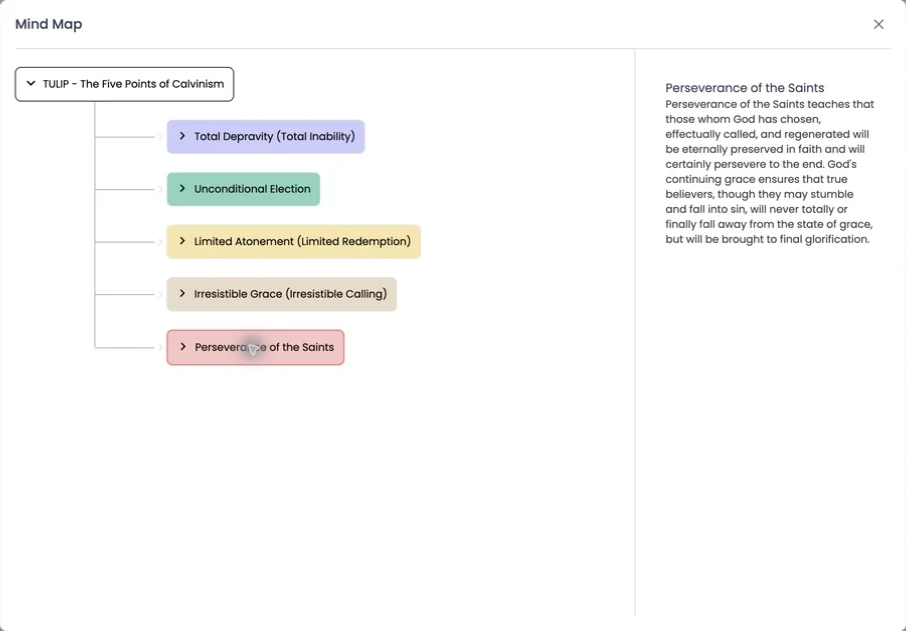
A visual breakdown of the book's ideas and structure at a glance. Expand any branch to go a level deeper.

  • Expandable branches
  • Select a branch to read what it covers
Mind map
A mind map of TULIP: The five points of Calvinism, with five expandable branches and a description of the selected branch
Tool 04

Knowledge graph

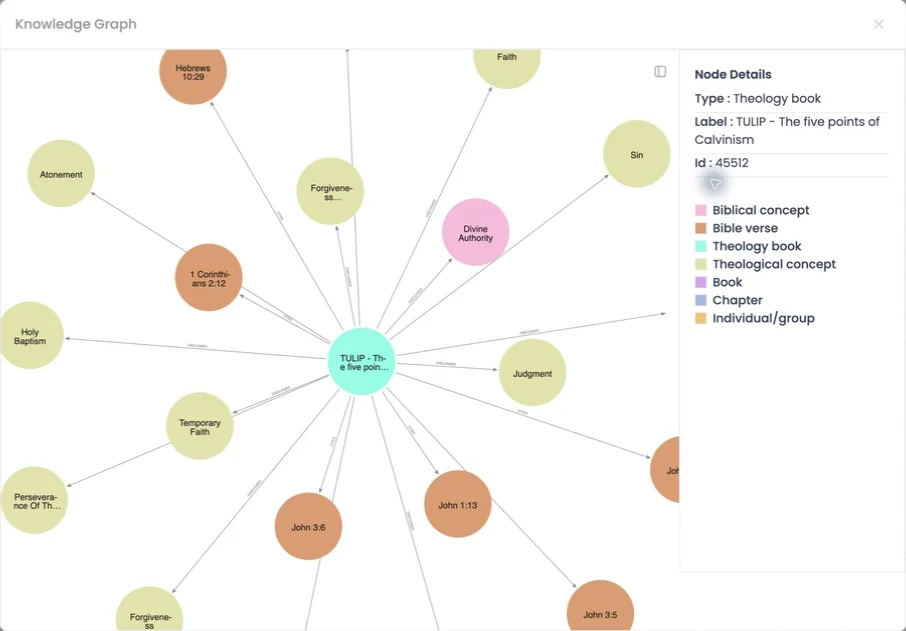
A clickable map of how the book's ideas connect. Every node is typed, so you can follow the relationships instead of the page order.

Node types: Book Chapter Theological concept Biblical concept Verse Individual or group
Knowledge graph
A knowledge graph linking a book to theological concepts, a biblical concept and Bible verses, with a legend of node types
Tool 05

Podcast

A two-speaker audio overview of the book: dense material as an engaging discussion, with an Interactive switch.

  • Two voices, one conversation
  • Turns commutes and workouts into study time
Audio

Learn with your eyes closed.

Commuting, exercising, resting your eyes: Hokma keeps working.

Podcast-style overviews

One action turns any book or document into a spoken conversation between two AI voices: dense material as an engaging discussion.

Read-aloud

Have any text spoken aloud, for hands-free reading and accessibility.

Voice input

Speak your questions and notes instead of typing.

Translation

Study across languages, not around them.

Translate a whole book on demand and read it in your language. Translate just the passage you've highlighted, inline. Keep the original and its translation aligned, side by side. And get the tutor's answers in the language you prefer. Translation runs throughout the app, not as a bolt-on.

  • Selected passages translate inline, right on the page
  • Reading languages include English, Dutch and Tamil
Notes & knowledge base

Everything you learn, kept, and questionable.

Every note remembers the exact passage that prompted it. Highlights, comments, and annotations are captured right from the reader. Then Hokma turns it all into a personal knowledge base: search it, ask questions of it, and resurface what you've learned, with full versioning of notes and chats.

  • Save turns any passage into a titled note
  • The passage stays attached as a reference
  • Read in context jumps straight back to the source
Library & search

A library that understands what you're looking for.

Organize with folders, tags, and collections. Search your uploads and the curated library together in one query. Semantic search finds ideas by meaning, not just keywords, and guided discovery suggests searches and topics based on what you're studying, so you find threads you didn't know to look for.

  • Search scopes: All, Books, or Bible
  • Answers cite book and page, and suggest concepts to explore next
  • Upload your own PDFs of up to 400 MB
Progress

Momentum you can see.

Hokma tracks what you've studied and how far you've come, keeping momentum across sessions, quietly reinforced by the in-reading check-ins that measure and encourage engagement.

Early access

Ready to read differently?

Join the waitlist and be first in when Hokma launches.

Tell us a little about yourselfTakes about 20 seconds

We use these details only to plan your access and invitations. See our privacy policy.

You're on the list.

We'll email your invitation as soon as your spot opens, in order of signup.

Talk to us about your institution →
Free to joinNo spam, unsubscribe anytimeInstitutions can join earlier